01 / Plesk alternativeUpdated 7 Nov 2026 · prices checked November 2026
CTAPanel
A Plesk alternative priced per fleet, not per server
CTAPanel is a hosting control panel for your own Linux servers. It runs hosting accounts, resellers, email, DNS, SSL, databases, FTP and backups, with an admin panel on port 1001 and an account panel on port 1002. Plesk licences are priced per server by the number of domains, and the prices change on 1 January 2027. A CTAServer plan covers the whole fleet with unlimited accounts and domains: one server with 30 domains costs $29.99 a month on Plesk Web Pro and $19 on CTAPanel.
The four differences that decide most moves, then who should switch and who should stay on Plesk.
01
One price for the fleet
Plesk bills every server by its domain count. CTAServer bills your organisation once, and accounts and domains are unlimited. 5 servers with 50 domains each cost $314.95 a month on Plesk and $19 on CTAPanel.
02
Resellers on every plan
On Plesk, customer accounts need Web Pro and resellers need Web Host. Every CTAServer plan has hosting accounts, packages and resellers. Customers and resellers work on port 1002, admins on port 1001.
03
Protection on from the start
OpenLiteSpeed with HTTP/3, ModSecurity with the OWASP Core Rule Set, ClamAV, fail2ban and per-account RAM and CPU limits through Linux cgroups are set up at install. On Plesk, HTTP/3 is experimental and Fail2Ban is off by default.
04
A planned way out of Plesk
Subscriptions move to a CTAPanel server up to 50 at a time, with site files, databases and mailboxes with their passwords. Plesk servers you keep stay in the same CTAServer list.
CTAPanel fits if
You sell shared or reseller hosting on Linux and pay for Web Host on every server to get resellers or more than 30 domains.
You run several servers and want them in one list, with one search, one alert list and one audit log.
Your customers need mail, DNS, files, databases, SSL and backups more than an app catalogue.
You want CPU and RAM limits for every account without buying a higher edition.
Plesk is still the better fit if
×You host ASP.NET sites on IIS or Microsoft SQL Server databases on Windows Server.
×Your customers rely on WP Toolkit with cloning and staging, or on Git deployment.
×Account owners need SSH, Node.js apps, Docker or PostgreSQL.
×You need the panel in a language other than English or Turkish. Plesk ships over 30.
03 / Two panelsPorts 1001 · 1002
An admin panel and an account panel, on every server
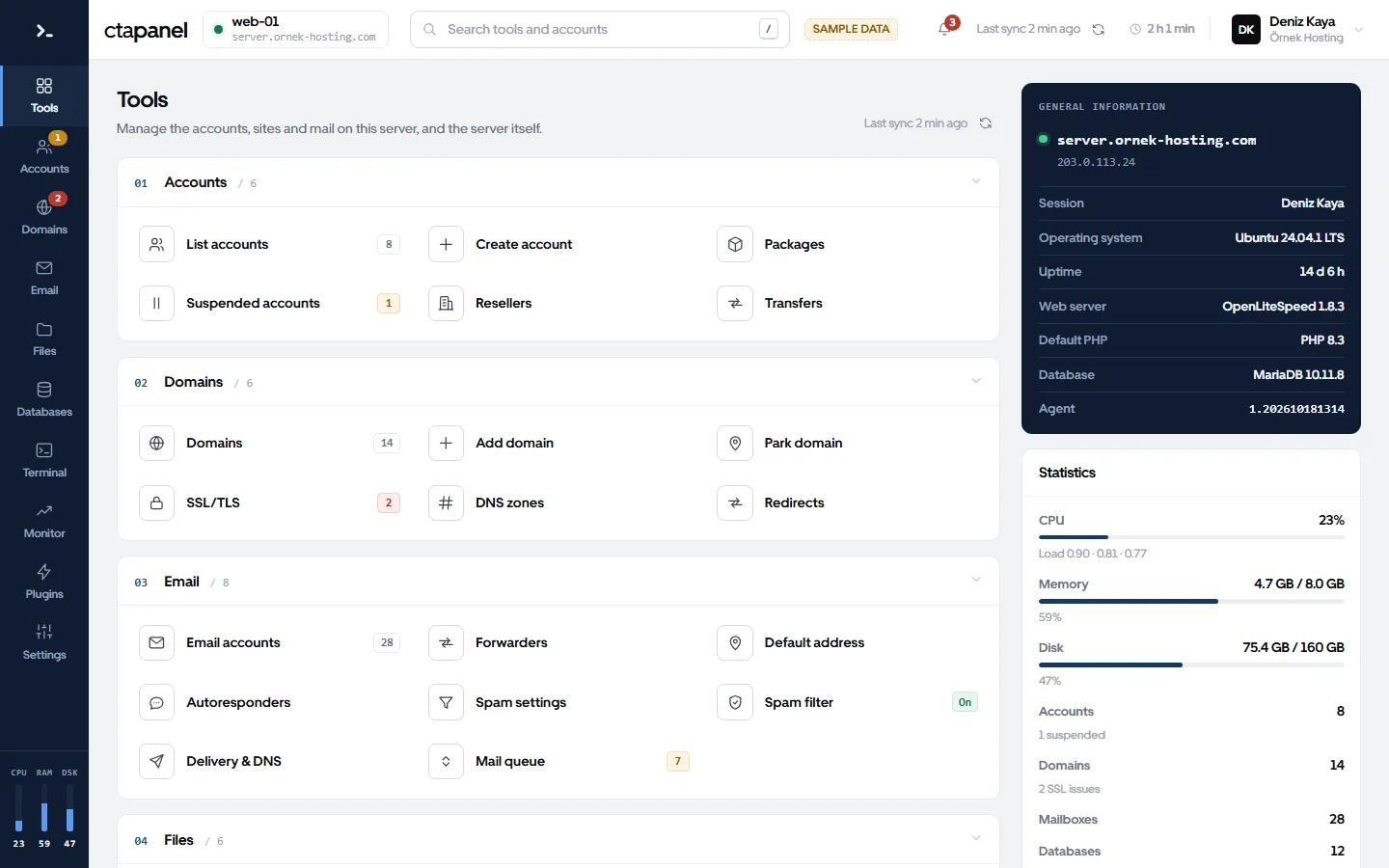
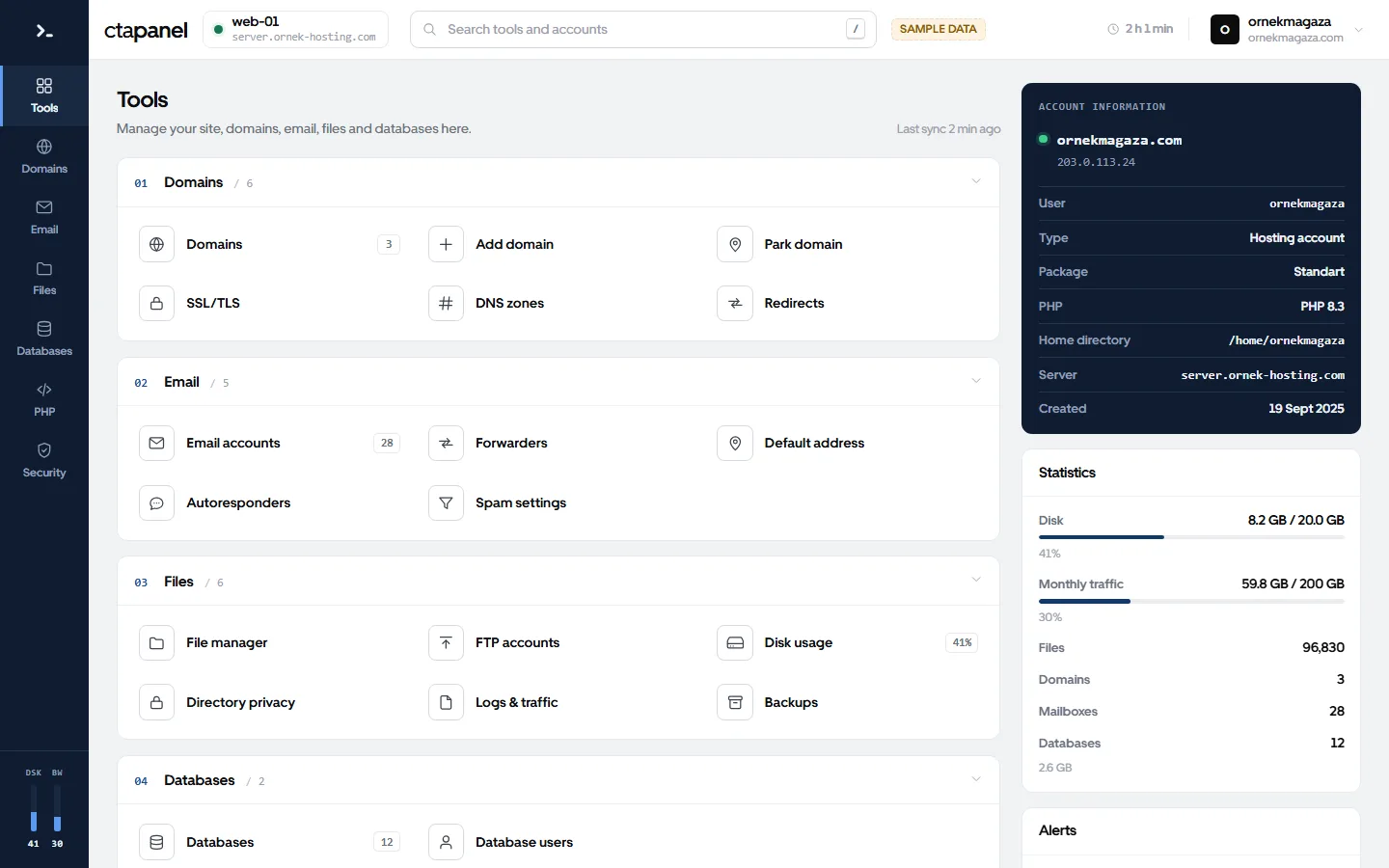
Plesk has one interface on port 8443, and admins, resellers and customers each see their own view of it. CTAPanel has two doors on the server itself, laid out the same way, so admins and account owners find things in the same place. The screenshots are the real interface with sample data.
Admin home on port 1001: tools by group, server details and live CPU, RAM and disk.
Port 1001
Server panel for admins
Opens from app.ctaserver.com with a one-time link, so there is no password form to attack. It has 50 tools in eight groups:
Accounts, packages, resellers and transfers
Domains, parked domains, SSL, DNS zones and redirects
Mailboxes, forwarders, autoresponders, spam filter, delivery checks and the Exim queue
File manager, FTP, disk usage, logs and backups
PHP versions, php.ini, software and cron jobs
ModSecurity, virus scanner, login protection, firewall, SSH, root password and OS updates
Databases and database users with phpMyAdmin
Terminal, assistant, services, live monitor, alerts, jobs, audit log, settings and plugins for LiteSpeed Enterprise and CloudLinux
Account home on port 1002: the customer’s tools, package, PHP version and usage.
Port 1002
Account panel for customers
Hosting accounts sign in with a username and panel password, with optional two-factor codes. Each account gets 25 tools, and resellers also get their customers and packages:
Domains: add, park, SSL, DNS zone and redirects
Email: mailboxes, forwarders, default address, autoresponders and spam settings
Files: file manager, FTP accounts, disk usage, protected folders, logs and backups
Databases and database users with phpMyAdmin
PHP version and php.ini, cron jobs
ModSecurity and virus scans for their own sites
Password and two-factor sign-in
04 / PriceUSD · excl. VAT
Plesk pricing against CTAPanel pricing
Plesk’s store prices change on 1 January 2027 for new orders and all renewals. The tables show both price lists next to the CTAServer plans, which include CTAPanel on every server. Plesk prices are for a VPS licence billed monthly.
Monthly cost for the same fleet
Fleet
Plesk today
CTAPanel
Difference
Plesk from 1 Jan 2027
1 server × 10 domains
$16.99Web Admin
$19Solo
-$2.01
$18.99
1 server × 30 domains
$29.99Web Pro
$19Solo
$10.99
$33.99
1 server × 60 domains
$62.99Web Host
$19Solo
$43.99
$73.99
3 servers × 50 domains
$188.97Web Host
$19Solo
$169.97
$221.97
5 servers × 50 domains
$314.95Web Host
$19Solo
$295.95
$369.95
10 servers × 100 domains
$629.90Web Host
$29Team
$600.90
$739.90
20 servers × 200 domains
$1,259.80Web Host
$39Scale
$1,220.80
$1,479.80
Plesk store prices per server (VPS licence)
Edition
Domains
Today
From 1 Jan 2027
Plesk Web Admin
10
$16.99
$18.99
Plesk Web Pro
30
$29.99
$33.99
Plesk Web Host
Unlimited
$62.99
$73.99
CTAServer plans
Plan
Servers
Domains
Monthly
Yearly
Solo
5
Unlimited
$19
$192
Team
10
Unlimited
$29
$312
Scale
20
Unlimited
$39
$432
Your own numbers
Plesk on every server$314.95/ monthWeb Host · $62.99 per server
CTAPanel$19/ monthCTAServer Solo · up to 5 servers, unlimited accounts and domains
Licences you add yourself, such as CloudLinux or LiteSpeed Enterprise, cost the same on both sides and are not included. Paid Plesk extensions are not included either.
Plesk store prices in US dollars for a VPS licence billed monthly, excluding VAT, checked November 2026. Prices from hosting providers and Plesk partners differ, so compare with your own invoice.
Plesk counts domains, not accounts. Web Admin has no customer accounts or subscriptions, and Web Pro has no reseller management.
CTAServer prices exclude VAT. Every plan has every feature and priority support, except that Solo has no AI features or team members; Team adds them. Paid yearly, the plans cost $16, $26 and $36 a month.
Every CTAPanel cell was checked in our code, and every Plesk cell in Plesk’s own documentation, before it went on this page. Where CTAPanel is weaker, the cell says so.
Feature
Plesk
CTAPanel
Licence and price
Licence model
PleskPer server, priced by domain count: Web Admin up to 10, Web Pro up to 30, Web Host unlimited. Mailboxes are unlimited in every edition
CTAPanelOne subscription for the whole fleet: 5, 10 or 20 servers. Hosting accounts and domains are unlimited on every plan
1 server, 30 domains
PleskWeb Pro $29.99 a month ($27.49 billed yearly), $33.99 from 1 Jan 2027
CTAPanelSolo $19 a month ($16 billed yearly), and it covers up to 5 servers
5 servers, 50 domains each
Plesk$314.95 a month, one licence per server
CTAPanel$19 a month, one plan for the whole fleet
Free trial
Plesk14-day trial licence for up to 3 domains
CTAPanel7 days with every feature, no card
Features by price tier
PleskWeb Admin has no customer accounts or subscriptions and only WP Toolkit SE. DNSSEC, PostgreSQL and Cgroups Manager start at Web Pro; resellers need Web Host
CTAPanelEvery plan has every hosting feature, resellers included. Solo has no AI features or team members
Panels and access
Admin panel
PleskPlesk on port 8443, one per server. Web Admin offers only the Power User view
CTAPanelServer panel on port 1001. It opens from app.ctaserver.com with a one-time link and has no password form
Customer panel
PleskCustomers and resellers sign in to the same Plesk on port 8443 and see only their own subscriptions. Not in Web Admin
CTAPanelAccount panel on port 1002 for hosting accounts and resellers, laid out like the admin panel
Many servers in one place
PleskEach server has its own Plesk
CTAPanelEvery server in one list at app.ctaserver.com, including servers that still run Plesk, cPanel or DirectAdmin
Two-factor sign-in
PleskMulti-Factor Authentication extension with authenticator app codes; it can be made mandatory for admins, resellers and customers
CTAPanelTOTP on the account door with 8 single-use recovery codes. Admins and resellers can reset it
Interface languages
PleskOver 30, Turkish included
CTAPanelEnglish and Turkish
API and billing
PleskREST API, XML API and command-line tools. WHMCS ships a Plesk module
CTAPanelREST API with keys bound to one server, an IP allowlist and scopes. WHMCS module: create, suspend, terminate, change package or password, usage and single sign-on
Operating system and web server
Windows Server
PleskWindows Server 2016 to 2025 with IIS, ASP.NET and Microsoft SQL Server. The same licence installs on Linux or Windows
CTAPanelNot supported. CTAPanel installs on Linux only
Linux systems
PleskAlmaLinux 8–10, Rocky Linux 8, CloudLinux 7–9, RHEL 8–9, Ubuntu 18.04–26.04, Debian 10–13 and CentOS 7, the oldest under paid extended support
CTAPanelAlmaLinux and Rocky Linux 8, 9 and 10, CloudLinux 8 and 9, Ubuntu 22.04, 24.04 and 26.04, Debian 12 and 13
Web server
PleskApache with nginx as a reverse proxy, or nginx alone, chosen per site. IIS on Windows
CTAPanelOpenLiteSpeed, or LiteSpeed Enterprise with your own licence. Apache and nginx are not offered
HTTP/3 (QUIC)
PleskThrough nginx only, off by default and marked experimental. Turned on from the command line
CTAPanelOn at install, with UDP 443 opened in the firewall
.htaccess
PleskRead by Apache. Sites served by nginx alone do not use it
CTAPanelOpenLiteSpeed reads rewrite rules. File blocks, protected folders and php_value are translated, and the rest is reported per site. LiteSpeed Enterprise reads .htaccess itself
PHP, apps and developer tools
PHP versions
PleskPHP 5.2 to 8.5 shipped. Version and handler (PHP-FPM or FastCGI) per domain, with PHP settings per domain
CTAPanelLSPHP 8.1 to 8.4 installed (8.3 by default), 7.4 and newer available. Version and 15 php.ini directives per account
Node.js, Ruby and .NET apps
PleskNode.js Toolkit and Phusion Passenger run customers’ Node.js and Ruby apps. ASP.NET on Windows
CTAPanelAdmins run Node.js, Python and .NET apps under systemd. Not available to hosting accounts
Docker
PleskDocker extension: run containers on the server or on a remote Docker host
CTAPanelNot available
WordPress tools
PleskWP Toolkit with installs, cloning, staging and sync in Web Pro and Web Host. Web Admin gets the limited SE edition
CTAPanelNot yet. No one-click installer or WordPress toolkit; Softaculous is listed as coming soon
Git deployment
PleskFree Git extension: push to the server, or pull from GitHub or Bitbucket, and deploy by hand or automatically
CTAPanelNot available
Accounts, limits and resellers
Hosting accounts
PleskCustomers with subscriptions and service plans, in Web Pro and Web Host. Each subscription has its own system user
CTAPanelCreate, suspend, terminate and change package. Each account is its own Linux user with its own home directory
Resource limits
PleskDisk space, traffic, domains, mailboxes and databases per service plan. CPU, RAM and disk I/O through Cgroups Manager in Web Pro and Web Host
CTAPanelDisk quota, inode limit, monthly bandwidth limit, and RAM and CPU limits through Linux cgroups on every plan. IO limits with CloudLinux LVE
Resellers
PleskReseller accounts and reseller plans in Web Host only
CTAPanelOn every plan: allowed packages, account limit, disk and bandwidth totals with or without overselling, and the reseller’s own packages
Shell access for accounts
PleskSSH per subscription, chrooted to the home directory or with a full shell
CTAPanelNot offered. Account owners use FTP, FTPS or the file manager
Domains, DNS and SSL
Domains, subdomains and aliases
PleskDomains, subdomains and domain aliases inside a subscription, with forwarding and a 301 redirect to HTTPS
CTAPanelAddon, sub and parked domains, 301 and 302 redirects and Force HTTPS. Parking first checks that the name points to the server
DNS
PleskBIND on Linux, Microsoft DNS on Windows. DNSSEC in Web Pro and Web Host; secondary servers through the Slave DNS Manager extension
CTAPanelPowerDNS with a zone editor, DNSSEC with DS records for the registrar, and up to 4 secondary name servers among CTAPanel servers
SSL certificates
PleskSSL It!: Let’s Encrypt including wildcard certificates, paid DigiCert certificates and your own uploaded certificates
CTAPanelLet’s Encrypt on every new account and domain, renewed when fewer than 30 days remain. No uploaded or wildcard certificates yet
Email
Mail server
PleskPostfix or qmail with Dovecot or Courier-IMAP, Roundcube webmail. MailEnable on Windows
CTAPanelExim and Dovecot with IMAP, POP3 and SMTP over TLS, SpamAssassin and CTAServer Webmail
Forwarding and auto-replies
PleskForwarding, mail aliases, auto-reply and a rule for mail to addresses that do not exist
CTAPanelUp to 500 forwarders, a default (catch-all) address and autoresponders with start and end dates
SPF, DKIM and DMARC
PleskDKIM signing, SPF with SRS for forwarded mail, DMARC and ARC
CTAPanelDKIM keys for every domain. SPF, DKIM, DMARC and MX are measured from public DNS per domain
Sending limits
PleskHourly limits on outgoing mail per mailbox, domain, subscription and service plan
CTAPanelHourly limit per account (50 by default) or per package. Exim queue: deliver, freeze or delete
Files and databases
File manager
PleskFile Manager with a code editor. Files are written as the subscription’s system user
CTAPanelExplorer with the VS Code (Monaco) editor, 512 MB uploads, zip and tar.gz, permissions. Runs as the account’s user
FTP
PleskProFTPD, with extra FTP users per subscription
CTAPanelPure-FTPd with FTPS. Extra accounts limited to a folder and a quota; live sessions can be ended
Databases
PleskMySQL or MariaDB with phpMyAdmin, local or on remote database servers. PostgreSQL from Web Pro; Microsoft SQL Server on Windows
CTAPanelMariaDB with phpMyAdmin, reachable only from the server. No PostgreSQL or remote MySQL
Visitor statistics
PleskGoAccess or Webalizer reports per site. AWStats is deprecated
CTAPanelAccess and error logs and monthly bandwidth. No visitor reports
Security
Brute force protection
PleskFail2Ban jails for Plesk and its services, off by default, Linux only. Admin access can be restricted by IP address
CTAPanelfail2ban for SSH, IMAP/POP3 and SMTP, with allow and deny lists that take CIDR blocks and ranges. The account door locks after repeated failures
Web application firewall
PleskModSecurity 2.9 on Apache or 3.0 on nginx, with free Atomic Standard, OWASP CRS or Comodo rules. Atomic Advanced is paid
CTAPanelModSecurity 3 with OWASP CRS 4.25, detect-only or block, off per site
Malware scan
PleskImunifyAV ships with Plesk for Linux
CTAPanelClamAV scans with quarantine, signatures updated every 4 hours
Account isolation
PleskPHP-FPM and FastCGI run as the subscription’s system user; scheduled tasks use a chrooted shell by default
CTAPanelPHP runs as the account’s own user; CageFS and LVE with CloudLinux
Backups
Backup destinations
PleskServer, FTP(S), Amazon S3 and S3-compatible storage, Google Drive and OneDrive. Scheduled cloud backups of subscriptions are a paid feature
CTAPanelctabox, S3-compatible (Wasabi, B2, R2, MinIO), Google Drive, Dropbox, Azure, another server or download
Incremental backups
PleskFull or incremental backups
CTAPanelFull archives only
Migration
Moving between servers
PleskPlesk Migrator moves subscriptions from another Plesk, cPanel or DirectAdmin server
CTAPanelFleet transfer from a Plesk server in your fleet to a CTAPanel server, up to 50 subscriptions at a time. No in-place switch
What moves from Plesk
PleskPlesk Migrator carries service plans, subscriptions, sites, mail and databases. PHP handlers, Fail2Ban, ModSecurity and firewall settings stay behind
CTAPanelFiles, domains and aliases, databases with their users, and mailboxes with mail and passwords. Forwarders, DNS records, SSL, cron, FTP accounts and DKIM keys do not move
Plesk backup files
PleskRestored with Backup Manager
CTAPanelCannot be restored. CTAPanel takes only a plain site backup: files and an .sql dump
AvailableLimited, or needs a higher edition or add-onNot available
06 / Screens10 screenshots
What CTAPanel looks like
Screenshots of the real server panel with sample data. Account names, domains and addresses are examples. Click an image to open it at full size.
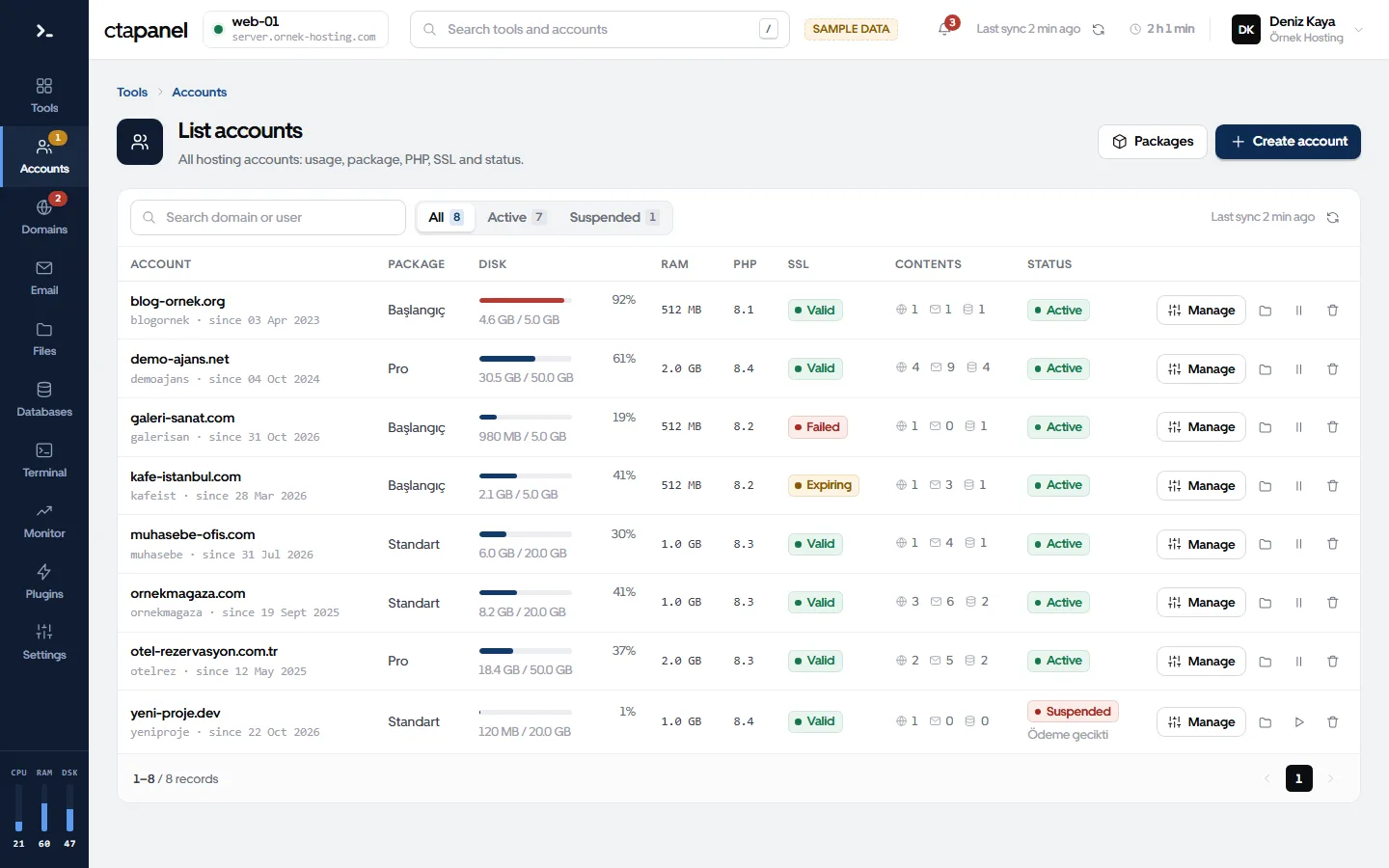
Hosting accounts
The list Plesk users know as subscriptions: package, disk, RAM, PHP, SSL state and status for every account, with suspend and manage actions.
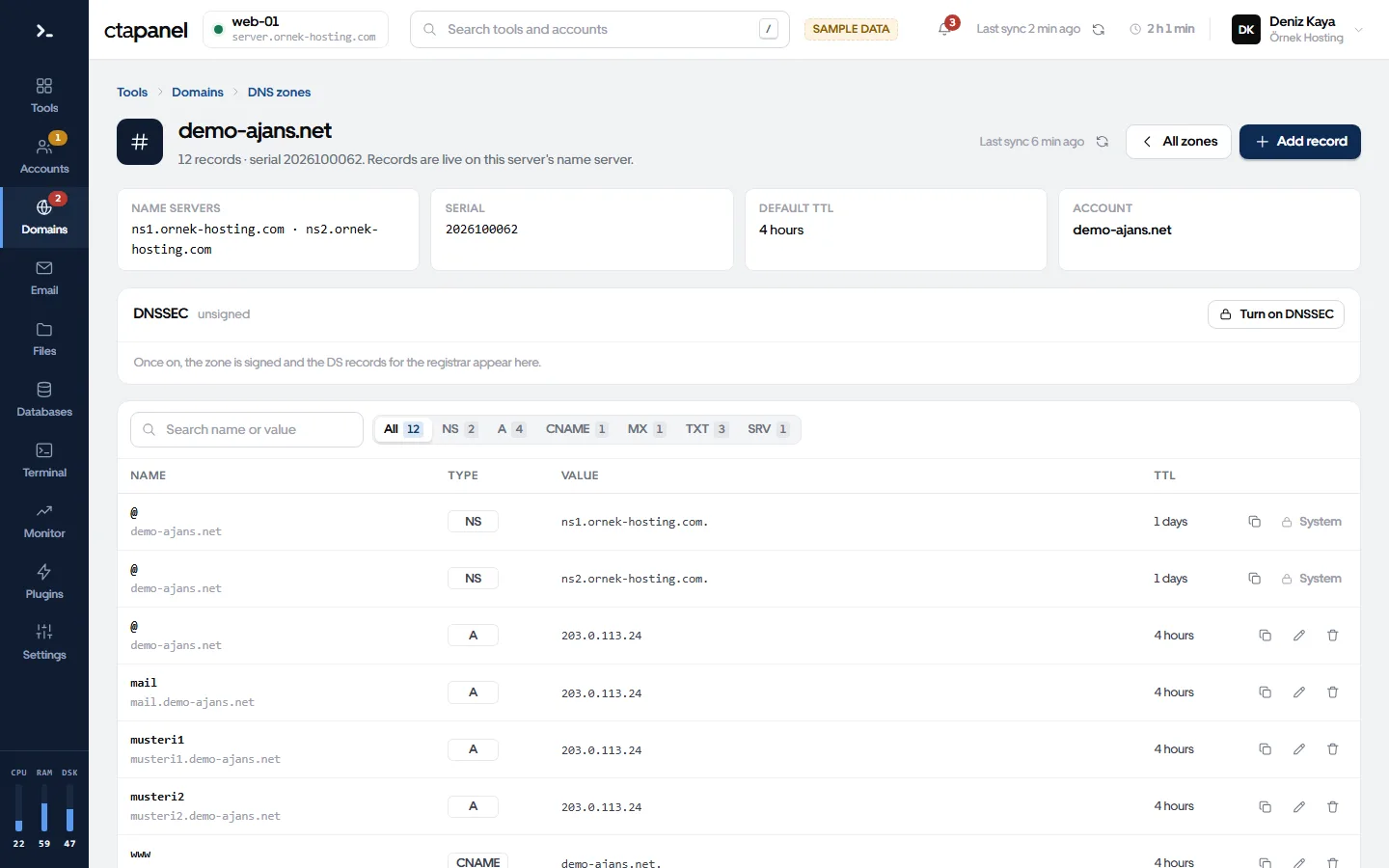
DNS zone editor
Records on the server’s own PowerDNS name servers, with DNSSEC one click away.
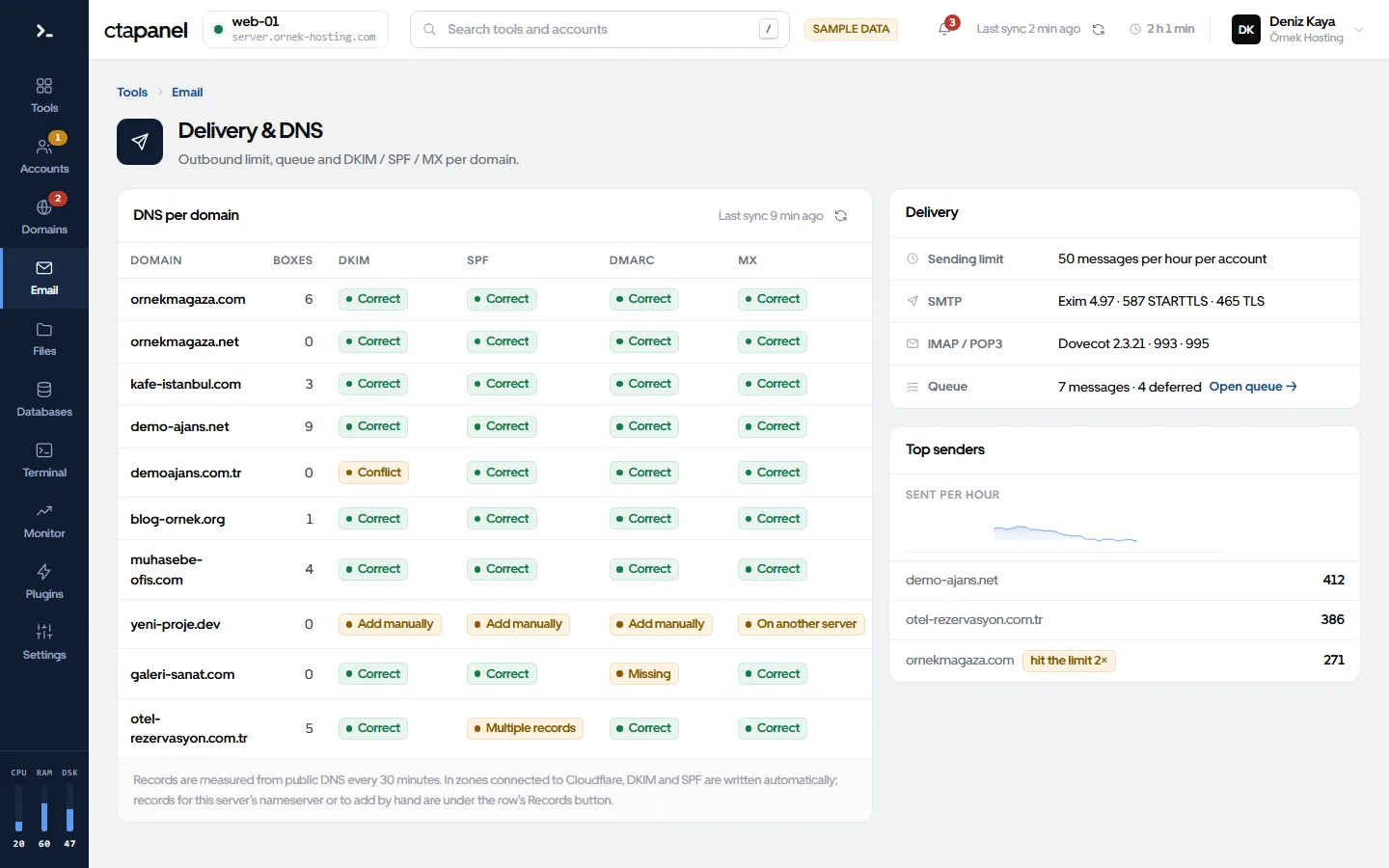
Mail delivery checks
DKIM, SPF, DMARC and MX per domain, the hourly sending limit and the senders closest to it.
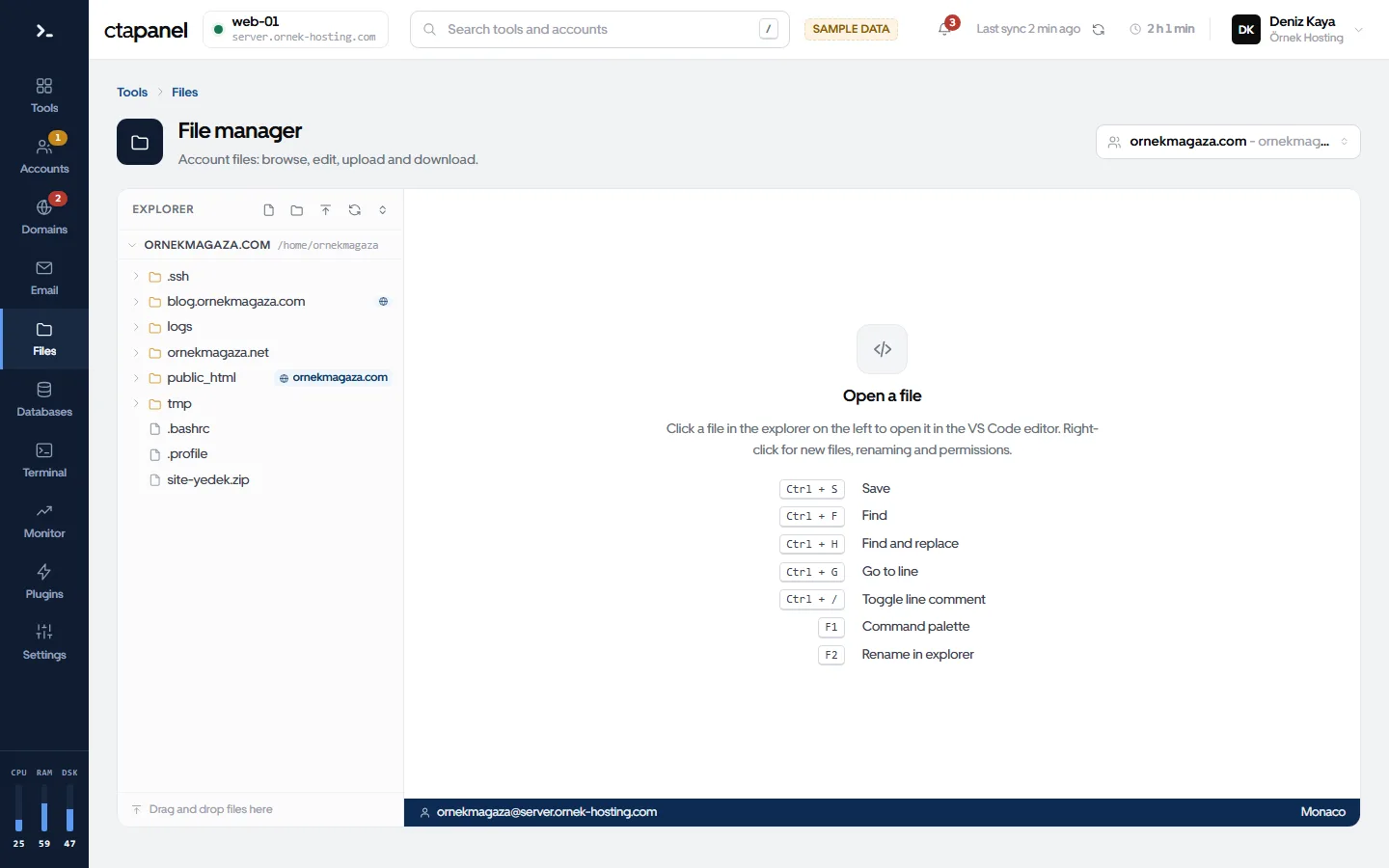
File manager
An explorer with the VS Code editor. Every operation runs as the account’s own Linux user.
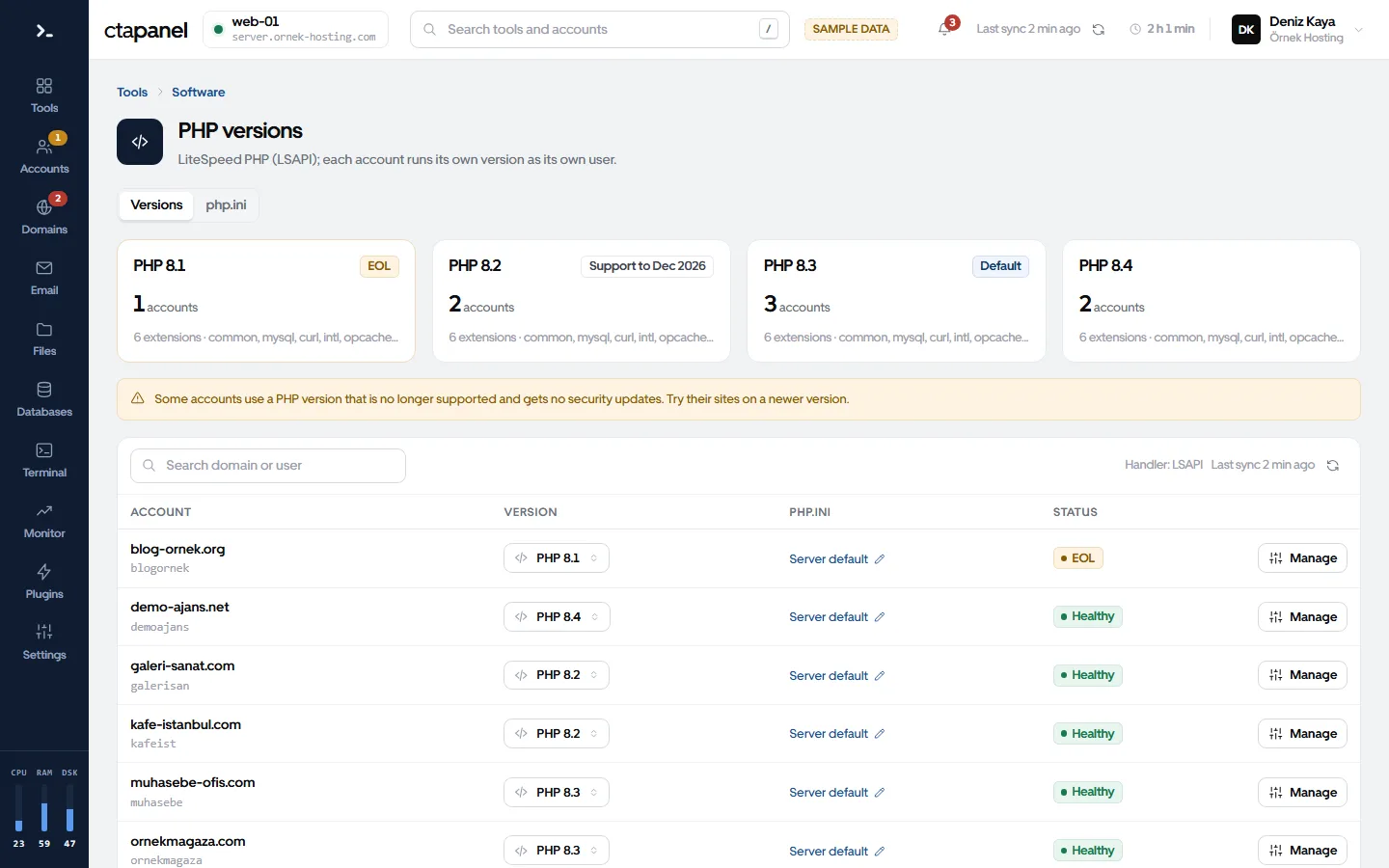
PHP versions
LSPHP 8.1 to 8.4 side by side, accounts per version and a warning for versions past end of life.
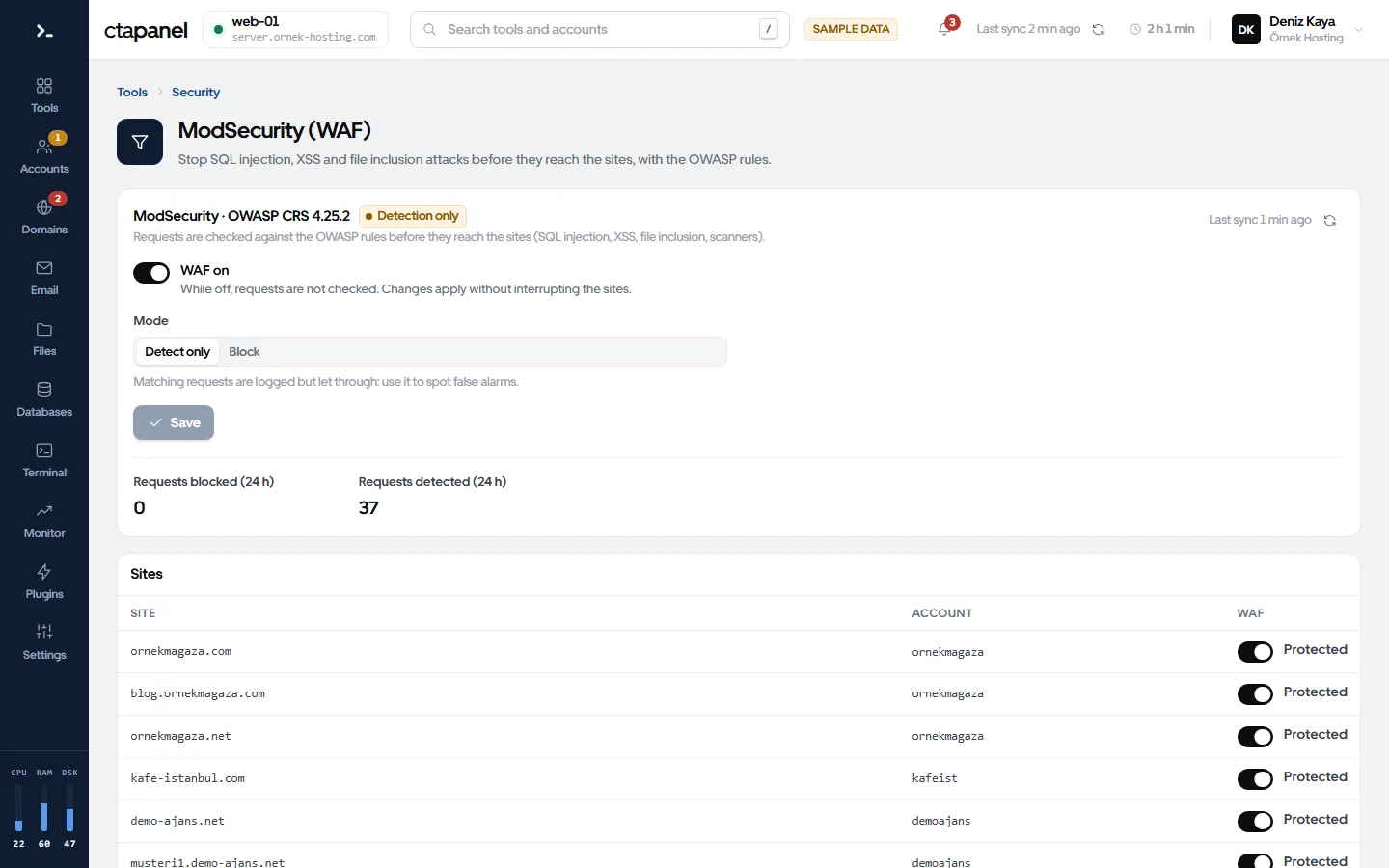
ModSecurity
OWASP Core Rule Set in detect-only or block mode, with blocked and detected requests and a switch per site.
Backups
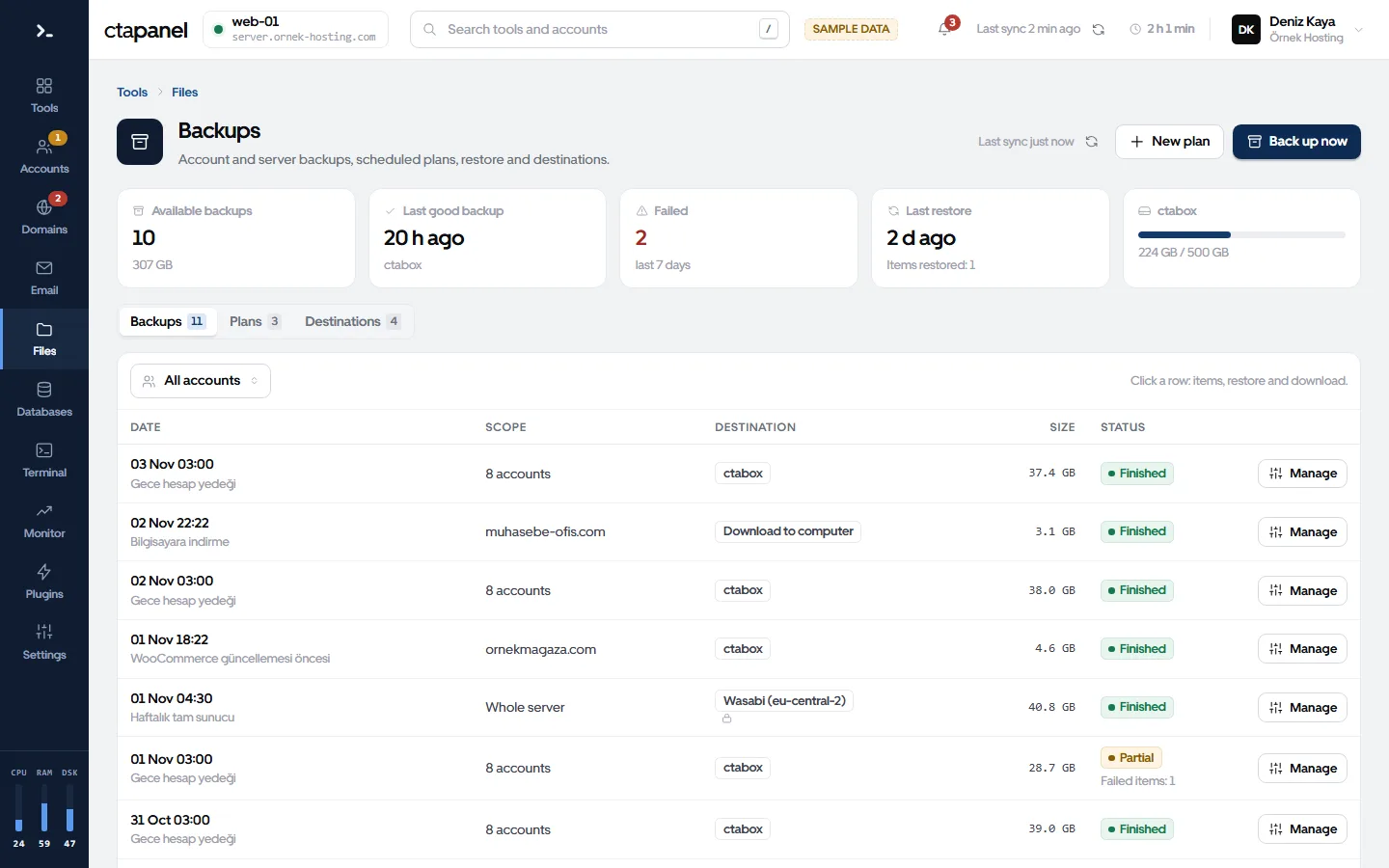
Backups, plans and destinations in one screen, with restore and download per backup.
LiteSpeed and CloudLinux
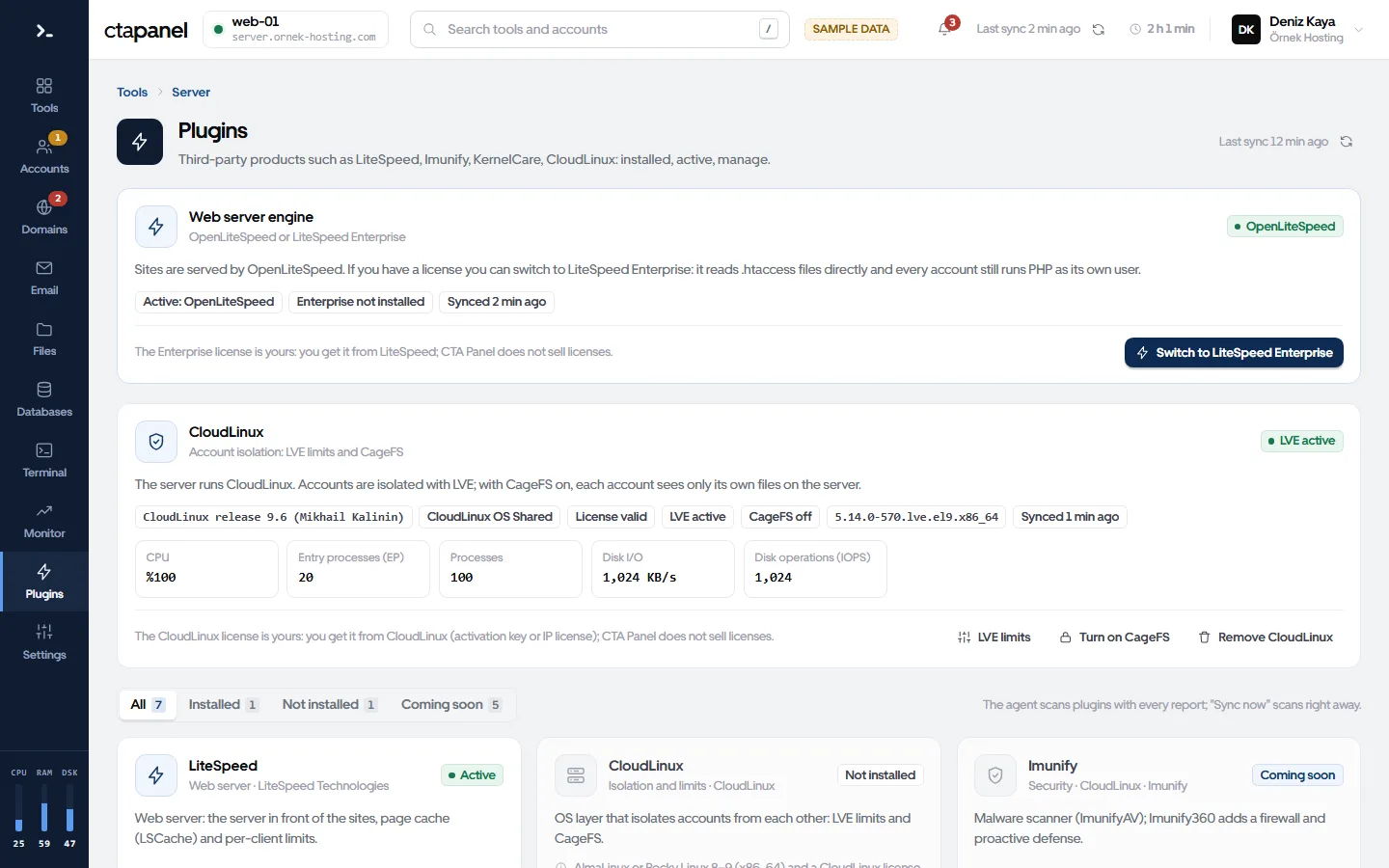
Switch to LiteSpeed Enterprise or convert to CloudLinux with your own licence, and undo either later.
07 / StackWhat runs on the server
What CTAPanel installs and runs
CTAPanel installs one stack on a clean Linux server and keeps it configured. You don’t pick between web servers or mail servers.
RAM and CPU through cgroups · disk quota and inodes · CloudLinux LVE and CageFS optional
Plesk for Linux serves sites with Apache behind nginx, or with nginx alone. CTAPanel uses OpenLiteSpeed, LiteSpeed’s open-source, event-driven web server. PHP runs through LSAPI as LSPHP, and every account’s PHP process runs as that account’s Linux user, so one site cannot read another site’s files through PHP. If you have a LiteSpeed Enterprise licence, the panel switches the server to Enterprise and back.
On Plesk, CPU, RAM and disk I/O limits come from Cgroups Manager, which is part of Web Pro and Web Host. CTAPanel sets RAM and CPU limits through Linux cgroups on every plan, together with a disk quota, an inode limit and a monthly bandwidth limit. When an account reaches its bandwidth limit, its sites show a notice until the next month, while mail, FTP and cron keep working.
Plesk supports more systems than CTAPanel: Windows Server, and older Linux releases such as CentOS 7 and Ubuntu 18.04 under paid extended support. CTAPanel runs on current Linux releases only, and every system on its list passed an install test on a clean server before it was added.
08 / SecuritySign-in and isolation
How CTAPanel protects sign-in
The login of a hosting panel is the most exposed part of the server, because the admin side holds root access.
Plesk gives you the tools and leaves several of them for you to switch on. The Multi-Factor Authentication extension adds codes from an authenticator app and can make them mandatory for admins, resellers and customers. Fail2Ban scans the logs of Plesk’s services for failed logins, but it is off by default. ModSecurity runs with free Atomic Standard, OWASP or Comodo rules, ImunifyAV ships with Plesk for Linux, and admin access can be restricted by IP address.
CTAPanel’s code is newer than Plesk’s and has had less outside review. What it does is keep the doors narrow, with protection on from the first install. These are the rules CTAPanel runs by:
Port 1001 opens only with a one-time ticket that app.ctaserver.com issues after you sign in there. The ticket is removed from the address bar at once.
02
A guarded account door
Port 1002 gives the same answer for every failed check, slows down by IP and by account, locks after repeated failures and accepts each TOTP code once.
03
Checked on every request
The account, its reseller and the subscription are checked again on every request, and each panel token can reach only its own routes and server.
04
Signed, short-lived grants
Actions that go straight to the server, such as SSL, files, services and the terminal, need an HMAC-signed grant that lasts minutes. The terminal also asks for a one-time code.
05
Each account as its own user
PHP, the file manager and cron run as the account’s Linux user. The file manager runs in a systemd sandbox that can write only to the account’s home.
06
Rules at the edge
ModSecurity with the OWASP Core Rule Set, fail2ban for SSH and mail logins, ClamAV with quarantine, and TLS 1.2 and 1.3 only on every listener.
09 / Migration3 ways
From Plesk to CTAPanel, three ways
Choose by where the subscriptions are today. A Plesk server is not converted in place: subscriptions move to a separate server that runs CTAPanel, or the Plesk server stays in your fleet as it is.
01New server
Fleet transfer
Add the Plesk server to CTAServer with its admin key and the agent, and add a server with no panel that runs CTAPanel. The transfer screen moves up to 50 subscriptions at a time. The two servers need no SSH between them: the source agent packs each subscription, and the package travels in chunks through the CTAServer API to the target agent.
02Any host
Fetch over FTP or SSH
When you only have FTP or SSH access to a site, the CTAPanel server copies its files into an existing account. Over SSH it can also bring the database. Plesk’s own backup files cannot be restored on CTAPanel; a plain site backup with the files and an .sql dump can.
03No move
Keep Plesk in the fleet
You don’t have to migrate at all. CTAServer manages Plesk servers through Plesk’s API on port 8443, next to CTAPanel servers: subscriptions, resellers, mail queues, Fail2Ban jails and firewall rules sit in the same lists, and your Plesk licence stays as it is.
How a fleet transfer runs
01
Connect both servers
The Plesk server joins with an admin key and the CTAServer agent. The target is a Linux server with no panel that runs CTAPanel.
02
Pick subscriptions
Choose up to 50. Each server takes part in one transfer at a time; the next one waits until the current one closes.
03
Precheck
Before anything starts, a check from stored data looks at both agents, account names, domain clashes, and disk and inode room on the target.
04
Package and send
The source agent packs the site files, the main domain, addon and subdomains as separate sites, domain aliases, MySQL databases with their users and password hashes, and mailboxes with their mail.
05
Create on the target
The account is created and wp-config.php gets the new database names. Mailbox passwords, which Plesk keeps readable, are stored as hashes on the target.
Nothing on the target server is overwritten. If a step fails after the account has been created, the account stays on the target so you can inspect what arrived.
What does not move
!Email forwarders, autoresponders and DKIM keys. Set them up again on the target and publish the new DKIM record.
!DNS zone records and SSL certificates. Recreate custom records before you switch name servers; Let’s Encrypt issues new certificates once the domains point to the new server.
!Cron jobs and FTP accounts.
!Service plans, reseller ownership and the PHP version. Accounts get the server’s default PHP, so check older sites after the move.
!The username changes to lowercase letters and digits, up to 16 characters.
10 / GapsNot there yet
What CTAPanel does not do yet
These are the Plesk features CTAPanel does not have today. If one of them is central to your business, keep Plesk on that server and manage it from CTAServer.
01Windows hosting
No Windows Server, IIS, ASP.NET or Microsoft SQL Server. CTAPanel installs on Linux only.
02WordPress tools and app installer
No WP Toolkit, cloning, staging or one-click installer. Softaculous is listed as coming soon.
03Developer tools
No Git deployment and no Docker. Hosting accounts cannot run Node.js or Python apps; admins can run apps under systemd.
04Shell for accounts
Hosting accounts get no SSH. They use FTP, FTPS or the file manager.
05PostgreSQL and remote MySQL
MariaDB only, reachable from the server itself.
06Your own certificates
Let’s Encrypt only: no uploaded, paid or wildcard certificates yet.
07Backup formats
Full archives only. No incremental backups and no FTP destination.
08Visitor statistics
Raw access and error logs and monthly bandwidth, but no GoAccess- or Webalizer-style reports.
09Languages
The panels are in English and Turkish. Plesk ships over 30 interface languages.
10An outside service
The panels sign in through app.ctaserver.com. If the subscription ends or that service is unreachable, the panels cannot be used, while sites, mail and DNS keep running on the server’s own services.
11 / Other panels9 alternatives
Other Plesk alternatives worth knowing
CTAPanel is not the only option. These are the panels that come up most often next to Plesk, with their prices, account limits and mail server side by side. CTAServer also manages Plesk, cPanel and DirectAdmin servers, so a mixed fleet stays in one list.
PanelLicence
Paid from (one server)
Unlimited accounts
Mail server
Good to know
CTAPanelCommercial, per fleetthis page
$19/mo for up to 5 servers
Every plan
Exim + Dovecot
One plan covers the whole fleet. Also manages Plesk, cPanel and DirectAdmin servers next to its own.
cPanel & WHMCommercial, per server
$29.99/mo, 1 account (Solo)
No: Premier covers 100 accounts, then $0.49 each
Exim + Dovecot
Owned by WebPros, like Plesk. Prices rise again on 16 December 2026.
DirectAdminCommercial, per server
$5/mo, 2 accounts (Personal PLUS)
Standard, $29/mo
Exim + Dovecot
Close to cPanel for shared and reseller hosting. Managed from CTAServer like any other server.
OpenPanelFree Community, paid Enterprise
€14.95/mo (Enterprise)
Enterprise, €14.95/mo
Enterprise only
Each user runs in an isolated container. Community is for personal use: 3 users and 50 domains.
CyberPanelFree, open source (GPLv3)
Free; add-ons from $7.99/mo
Free with OpenLiteSpeed
Postfix + Dovecot
Built on OpenLiteSpeed. Popular for WordPress on a single VPS.
HestiaCPFree, open source (GPLv3)
Free, no paid tier
Free
Exim + Dovecot
Fork of VestaCP. Installs on Debian 12–13 and Ubuntu 22.04–26.04 only.
VirtualminFree GPL, paid Pro
Pro $7.50/mo, 10 domains
GPL free; Pro unlimited $20/mo
Postfix + Dovecot
Hosting layer on top of Webmin. Very flexible, with a steeper learning curve.
ISPConfigFree, open source (BSD)
Free; migration toolkit €79/yr
Free
Postfix + Dovecot
Manages several servers from one interface, aimed at experienced admins.
CloudPanelFree, closed source
Free, no paid tier
Free
No mail server
Nginx and PHP-FPM for PHP applications on Debian and Ubuntu.
aaPanelFree, paid Pro
Pro $28.80/mo
Free: unlimited websites
Mail Server plugin
Point-and-click panel with a one-click app store, common on single servers.
AvailableLimited, or needs a higher edition or add-onNot available
Prices and features from each vendor’s own site, checked November 2026. Prices exclude VAT.
It depends on what you host. If you need Windows Server, IIS or WP Toolkit, stay on Plesk. For Linux shared and reseller hosting without a licence on every server, CTAPanel covers accounts, resellers, mail, DNS, SSL and backups on one fleet plan. cPanel and DirectAdmin are other paid panels licensed per server, and free panels such as HestiaCP or CloudPanel suit a single VPS you run yourself.
Q.02How much does Plesk cost in 2026?
Plesk store prices per server and month for a VPS licence, excluding VAT: Web Admin $16.99 for up to 10 domains, Web Pro $29.99 for up to 30 and Web Host $62.99 for unlimited domains. Billed yearly, they work out at $15.57, $27.49 and $57.74 a month. Web Host for a dedicated server costs $69.99. Prices from hosting providers and partners differ.
Q.03How much is Plesk going up on 1 January 2027?
Plesk says its licence prices change on 1 January 2027 for new orders and all renewals. The new monthly prices are Web Admin $18.99, Web Pro $33.99 and Web Host $73.99, the same for VPS and dedicated servers. Today they are $16.99, $29.99 and $62.99.
Q.04Is CTAPanel cheaper than Plesk?
5 servers with 50 domains each cost $314.95 a month on Plesk and $19 on CTAPanel, a difference of $295.95 a month or $3,551.40 a year. For one server with up to 10 sites of your own, Plesk Web Admin at $16.99 can cost less than the Solo plan at $19, but Web Admin has no customer accounts. The calculator on this page works it out for your own fleet.
Q.05Does CTAServer charge per server like Plesk?
No. A CTAServer plan covers a number of servers, not domains, and includes CTAPanel on each of them: Solo $19 a month for up to 5 servers, Team $29 for up to 10 and Scale $39 for up to 20, excluding VAT. Hosting accounts and domains are unlimited. Paid yearly, the plans cost $16, $26 and $36 a month, and the 7-day trial needs no card.
Q.06Does Plesk count domains or accounts?
Domains. Web Admin covers up to 10 domains on a server, Web Pro up to 30, and Web Host has no limit. Mailboxes and users are unlimited in every edition. CTAPanel counts neither domains nor accounts; the CTAServer plan counts servers.
Q.07Which Plesk edition do I need for resellers?
Web Host. Web Pro has customer accounts and subscriptions but no reseller management, and Web Admin has neither. On CTAPanel, resellers come with every plan: they get allowed packages, an account limit and disk and bandwidth totals, and they sign in on port 1002.
Q.08Can I move Plesk subscriptions to CTAPanel?
Yes, to a separate server that runs CTAPanel. Add the Plesk server to CTAServer with its admin key and the agent, then move up to 50 subscriptions per transfer. Site files, the main domain, addon domains and subdomains, domain aliases, MySQL databases with their users, and mailboxes with their mail and passwords move. A Plesk server cannot be switched to CTAPanel in place.
Q.09What does not move from Plesk?
Email forwarders and autoresponders, DNS zone records, SSL certificates, cron jobs, FTP accounts, DKIM keys, service plans, reseller ownership and the PHP version. Let’s Encrypt issues new certificates on the target, and accounts get the server’s default PHP. Usernames are converted to lowercase letters and digits, up to 16 characters.
Q.10Do mailbox passwords survive the move from Plesk?
Yes. Plesk keeps mailbox passwords in a readable form, so the transfer carries them over, and CTAPanel stores them as hashes. Users sign in with the same password on the new server.
Q.11Can I restore a Plesk backup on CTAPanel?
No. Plesk’s backup format cannot be restored on CTAPanel. Only a plain site backup works, meaning the site files and an .sql dump of the database. To move whole subscriptions, use the fleet transfer instead.
Q.12Does CTAPanel run on Windows?
No. CTAPanel installs on Linux only: AlmaLinux and Rocky Linux 8 to 10, CloudLinux 8 and 9, Ubuntu 22.04, 24.04 and 26.04, and Debian 12 and 13. If you host ASP.NET sites on IIS or Microsoft SQL Server databases, keep Plesk for Windows on those servers.
Q.13Can I keep my Plesk servers?
Yes. CTAServer manages Plesk servers through Plesk’s API on port 8443, next to CTAPanel servers. Subscriptions, resellers, mail queues, Fail2Ban jails and firewall rules from every server sit in the same lists, and the Plesk licence stays yours. You can move subscriptions later, up to 50 at a time.
Q.14Does CTAPanel have WP Toolkit, Git or Docker like Plesk?
No. CTAPanel has no WordPress toolkit, cloning, staging, Git deployment or Docker today. If your customers depend on WP Toolkit, Plesk Web Pro or Web Host is the better fit for those sites.
Q.15Does CTAPanel use nginx like Plesk?
No. Plesk for Linux serves sites with Apache behind nginx, or with nginx alone. CTAPanel uses OpenLiteSpeed, or LiteSpeed Enterprise with your licence, with HTTP/3 on from the start. OpenLiteSpeed reads .htaccess rewrite rules, translates common directives and reports the rest per site.
Q.16Is CTAServer affiliated with Plesk?
No. CTAServer is an independent product with no partnership with Plesk or WebPros. Plesk is their trademark, and the prices on this page are Plesk’s public store prices.
Free for 7 days, no card needed. Create your account, add your first server with an API token or an SSH key, and the panel starts filling in a few minutes later.
8–16% cheaper per month depending on the plan, billed once a year